01。
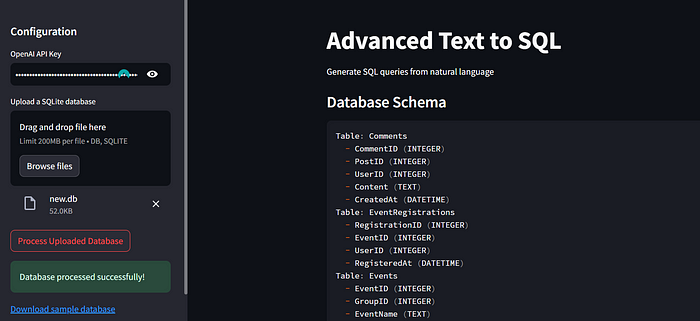
概述
02。
核心技术
02。
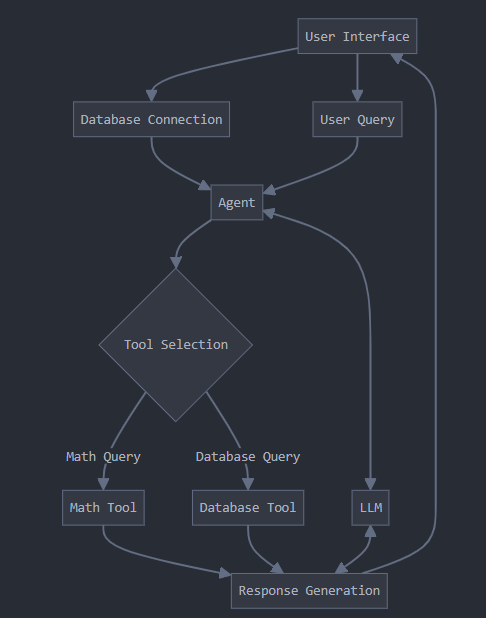
传统RAG实现
03。
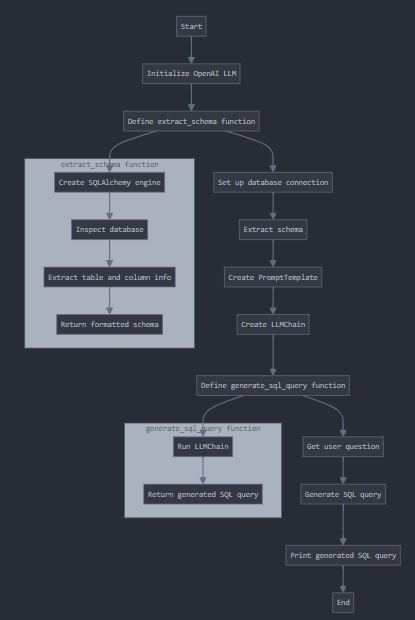
新方案
-
导入库
from langchain import OpenAI, LLMChain
from langchain.prompts import PromptTemplate
from langchain.utilities import SQLDatabase
from sqlalchemy import create_engine, MetaData, Table, Column, inspect
from langchain_experimental.sql import SQLDatabaseChain

# we kept the temp=0 as we dont want LLM to use creativity and randomness

llm = OpenAI(temperature=0, openai_api_key="your_openai_api_key")
-
提取数据库架构
def extract_schema(db_url):
    engine = create_engine(db_url)
    inspector = inspect(engine)
    schema_info = []
    for table_name in inspector.get_table_names():
        columns = inspector.get_columns(table_name)
        schema_info.append(f"Table: {table_name}")
        for column in columns:
            schema_info.append(f"  - {column['name']} ({column['type']})")
    return "n".join(schema_info)
-
使用LangChain创建提示模板
prompt_template = """
You are an AI assistant that generates SQL queries based on user requests.
You have access to the following database schema:
{schema}
Based on this schema, generate a SQL query to answer the following question:
{question}
SQL Query:
"""
prompt = PromptTemplate(
    input_variables=["schema", "question"],
    template=prompt_template,
)
-
生成SQL查询
chain = LLMChain(llm=llm, prompt=prompt)

def generate_sql_query(question):
    return chain.run(schema=schema, question=question)
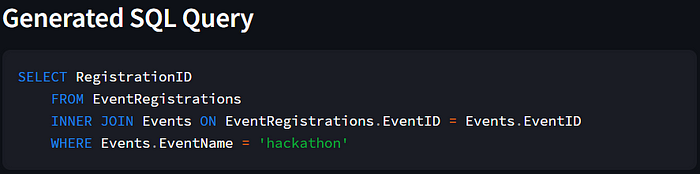
user_question = "Find me the registration id of the hackathon"
sql_query = generate_sql_query(user_question)
print(f"Generated SQL Query: {sql_query}")
04。
结论