


前言
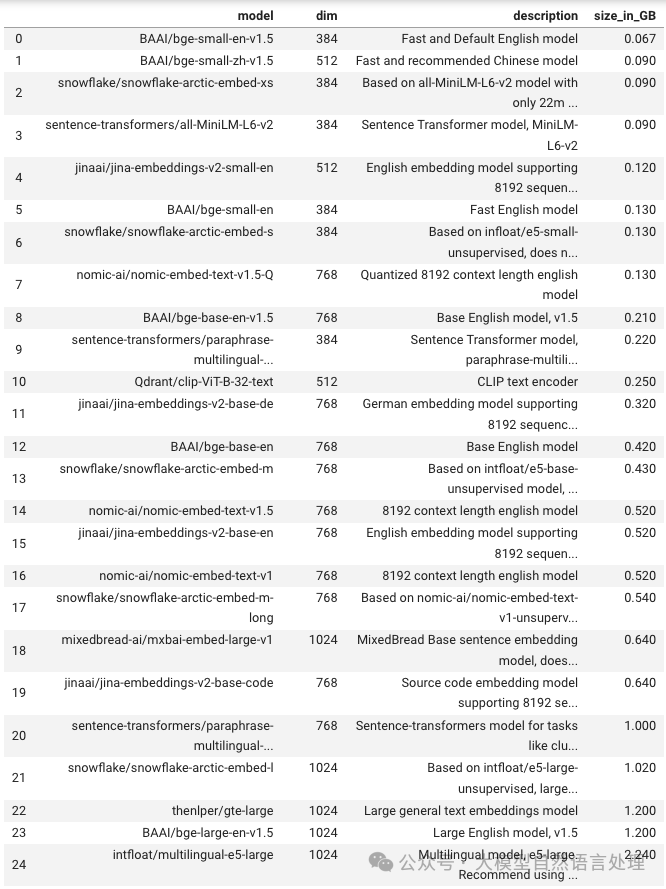
在进行文本嵌入时,尤其是RAG系统,有一个快速高效的文本嵌入工具是非常有必要的。因此,FastEmbed设计目标是提升计算效率,同时保持嵌入表示的质量。此外,FastEmbed还支持一些图像嵌入模型。
特点:
-
高效的计算速度,适合大规模数据处理;使用ONNX Runtime实现最优性能。 -
低资源消耗,适用于多种设备和环境。FastEmbed刻意减少了对外部资源的依赖,并选择了ONNX Runtime作为其运行时框架。 -
灵活性强,可应用于不同的 NLP 任务。 -
兼容GPU,支持GPU加速计算,进一步提升效率。
使用
安装
# CPU版
pip install fastembed

# GPU版
pip install fastembed-gpu
from fastembed import TextEmbedding
from typing import List

# Example list of documents
documents: List[str] = [
    "This is built to be faster and lighter than other embedding libraries e.g. Transformers, Sentence-Transformers, etc.",
    "fastembed is supported by and maintained by Qdrant.",
]

# This will trigger the model download and initialization
embedding_model = TextEmbedding()
print("The model BAAI/bge-small-en-v1.5 is ready to use.")

embeddings_generator = embedding_model.embed(documents)  # reminder this is a generator
embeddings_list = list(embedding_model.embed(documents))
# you can also convert the generator to a list, and that to a numpy array
print(len(embeddings_list[0]) ) # Vector of 384 dimensions
密集文本嵌入
from fastembed import TextEmbedding

model = TextEmbedding(model_name="BAAI/bge-small-en-v1.5")
embeddings = list(model.embed(documents))

# [
#   array([-0.1115,  0.0097,  0.0052,  0.0195, ...], dtype=float32),
#   array([-0.1019,  0.0635, -0.0332,  0.0522, ...], dtype=float32)
# ]
稀疏文本嵌入
SPLADE++
from fastembed import SparseTextEmbedding

model = SparseTextEmbedding(model_name="prithivida/Splade_PP_en_v1")
embeddings = list(model.embed(documents))

# [
#   SparseEmbedding(indices=[ 17, 123, 919, ... ], values=[0.71, 0.22, 0.39, ...]),
#   SparseEmbedding(indices=[ 38,  12,  91, ... ], values=[0.11, 0.22, 0.39, ...])
# ]
图像嵌入
from fastembed import ImageEmbedding

images = [
    "./path/to/image1.jpg",
    "./path/to/image2.jpg",
]

model = ImageEmbedding(model_name="Qdrant/clip-ViT-B-32-vision")
embeddings = list(model.embed(images))

# [
#   array([-0.1115,  0.0097,  0.0052,  0.0195, ...], dtype=float32),
#   array([-0.1019,  0.0635, -0.0332,  0.0522, ...], dtype=float32)
# ]
