

前面写过一次抱抱脸的Agent框架了,这次提供一个完整实验脚本,以及看看它的设计逻辑。再一次给大家安利一下,确实比较简单实用。
Agent的规划一般分为一次出来所有的action规划和一步一步的action规划。
transformers.agents中也主要支持这2种,但是变化很多,也可以体现出框架/Agent的灵活性。
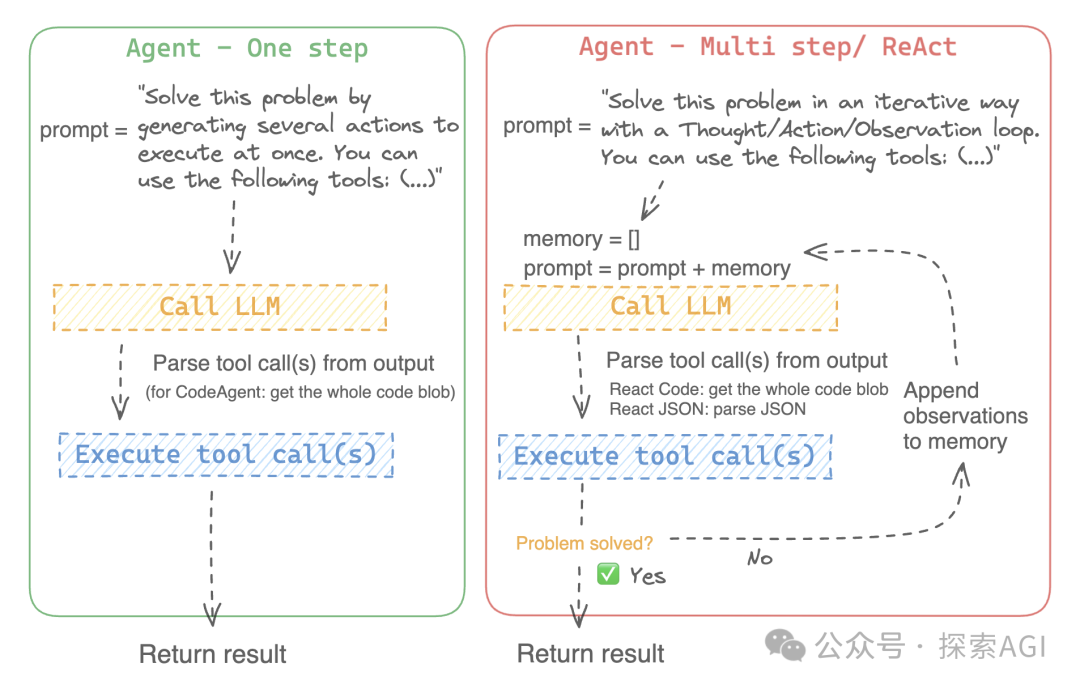
多步的有2种,一种用codeblock的形式,下图为codeAgent的示例,一次用一个codeblock生成所有的规划。下图为codeAgent的system prompt的示例部分,输出代码块
另外一种就是类似autogpt的形式,输出多个step,然后去调用
ReAct的system prompt为单步规划
ReAct可以跟code结合
一个完整的测试代码如下,代码用到的为一次规划出所有的Action,下图为日志
from zhipuai import ZhipuAI
client = ZhipuAI(api_key=".") # 填写您自己的APIKey

def llm_engine(messages, stop_sequences=None):
    response = client.chat.completions.create(
        model="glm-4-plus",
        messages=messages,
        stop=stop_sequences
    )
    return response.choices[0].message.content


from transformers import Tool

class Text2image(Tool):
    name = "text_to_image"
    description = (
        "这是一个根据文本生成图片的工具,它返回一个生成的图片路径"
    )

    inputs = {
        "prompt": {
            "type": "text",
            "description": "需要生成图片的描述文本",
        }
    }
    output_type = "text"

    def forward(self, prompt):
        response = client.images.generations(
            model="cogview-3-plus",
            prompt=prompt
        )
        print(response.data[0].url)
        return response.data[0].url


class ImageQuestionAnswering(Tool):
    description = "这是一个可以回答关于图片问题的工具,它返回一个文本,作为对问题的答案。"
    name = "image_qa"

    inputs = {
        "image_path": {
            "type": "text",
            "description": "图片路径或url",
        },
        "question": {"type": "text", "description": "问题"},
    }
    output_type = "text"

    def forward(self, image_path, question):
        if 'http' not in image_path:
            with open(image_path, 'rb') as img_file:
                img_base = base64.b64encode(img_file.read()).decode('utf-8')
        else:
            img_base = image_path
        response = client.chat.completions.create(
            model="glm-4v-plus",  # 填写需要调用的模型名称
            messages=[
              {
                "role": "user",
                "content": [
                  {
                    "type": "image_url",
                    "image_url": {
                        "url": img_base
                    }
                  },
                  {
                    "type": "text",
                    "text": question
                  }
                ]
              }
            ]
        )
        return response.choices[0].message.content

from transformers import Tool, load_tool, CodeAgent

agent = CodeAgent(tools=[Text2image(),ImageQuestionAnswering()], llm_engine=llm_engine, verbose=1)

agent.run(
    "画一张搞笑图片,然后描述一下这张图片为什么搞笑?以及图片内容是否符合你生成的prompt"
)