


核心内容概览
本文将带你从零开始,掌握使用火山引擎 Responses API 开发智能 Agent 的全流程。通过实战代码,你将学会:
-
1. Responses API 的基本使用方法 -
2. 通过 previous_response_id实现会话保持 -
3. 函数调用的完整流程 -
4. Agent 的思考-行动-观察循环实现 -
5. 实战:构建天气和时间查询 Agent
一、Responses API 基础
1.1 什么是 Responses API?
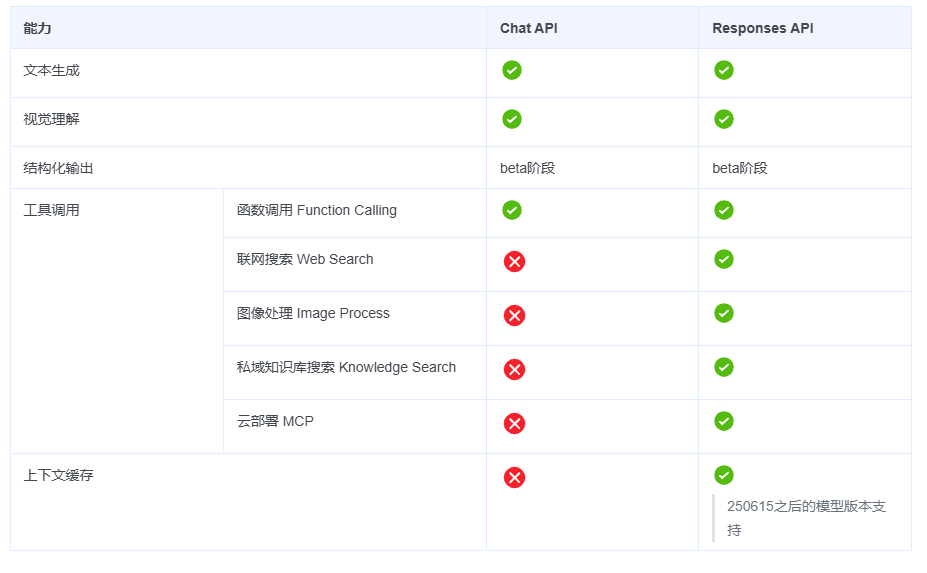
Responses API 是火山引擎专门为 Agent 应用设计的 API,相比传统 Chat API,它在会话管理、函数调用、多轮对话等方面做了专门优化,更适合构建智能 Agent 应用。
1.2 基本用法
最简单的单轮对话示例:
from volcenginesdkarkruntime import Ark
import os

client = Ark(api_key=os.getenv("VOLCENGINE_API_KEY"))

# 单轮对话
response = client.responses.create(
    model="doubao-seed-1-6-flash-250828",
    input=[{"role": "user", "content": "你好"}]
)

# 获取回复
print(response.output[0].content[0].text)
# 输出:你好!有什么我可以帮助你的吗?
二、会话保持:使用 previous_response_id
2.1 为什么需要会话保持?
在多轮对话中,AI 需要记住之前的对话内容。传统做法是每次都发送完整的对话历史,这会导致:
-
• Token 消耗大:每次都要重复发送历史消息 -
• 传输开销高:网络传输数据量大 -
• 开发复杂:需要手动维护对话状态
2.2 使用 previous_response_id 的优势
Responses API 通过 previous_response_id 实现会话保持:
# 第一轮对话
response = client.responses.create(
    model="doubao-pro-32k",
    input=[{"role": "user", "content": "我叫张三"}]
)
print(response.output[0].content[0].text)
# 输出:你好张三!

# 第二轮对话:使用 previous_response_id
second_response = client.responses.create(
    model="doubao-pro-32k",
    input=[{"role": "user", "content": "我刚才说我叫什么?"}],
    previous_response_id=response.id  # 引用上一轮的响应 ID
)
print(second_response.output[0].content[0].text)
# 输出:你刚才告诉我你叫张三。
2.3 关键原理
-
• 第一轮对话:发送完整输入,获得 response.id -
• 后续轮次:只发送新消息,引用 previous_response_id -
• 服务端处理:服务端根据 response_id恢复完整上下文
三、函数调用完整流程
3.1 什么是函数调用?
函数调用(Function Calling)允许 AI 模型调用外部工具或函数,获取实时数据或执行特定操作。这是构建 Agent 的核心技术。
3.2 完整流程
函数调用需要两次 API 请求:
第一步:触发工具调用
tools = [{
    "type": "function",
    "name": "get_current_time",
    "description": "获取当前时间",
    "parameters": {
        "type": "object",
        "properties": {
            "timezone": {
                "type": "string",
                "description": "时区,例如:Asia/Shanghai"
            }
        },
        "required": []
    }
}]

# 用户请求
response = client.responses.create(
    model="doubao-pro-32k",
    input=[{"role": "user", "content": "现在几点了?"}],
    tools=tools
)

# 检查输出类型
if response.output[0].type == "function_call":
    function_call = response.output[0]
    print(f"工具名称: {function_call.name}")
    print(f"参数: {function_call.arguments}")
    # 输出:
    # 工具名称: get_current_time
    # 参数: {"timezone": "Asia/Shanghai"}
第二步:回传工具结果
import json

# 执行工具函数
def get_current_time(timezone="Asia/Shanghai"):
    from datetime import datetime
    from zoneinfo import ZoneInfo
    tz = ZoneInfo(timezone)
    return datetime.now(tz).strftime("%Y-%m-%d %H:%M:%S")

# 获取工具结果
result = get_current_time("Asia/Shanghai")

# 回传结果
tool_response = client.responses.create(
    model="doubao-pro-32k",
    input=[{
        "type": "function_call_output",
        "call_id": function_call.call_id,  # 必须使用上一步返回的 call_id
        "output": json.dumps(result)
    }],
    previous_response_id=response.id  # 引用之前的会话
)

# 获取最终回复
print(tool_response.output[0].content[0].text)
# 输出:现在是 2025-01-15 10:30:45
3.3 关键点说明
-
1. 工具定义:在第一次请求时提供 tools参数 -
2. 函数调用触发:模型判断需要工具时, output[0].type为"function_call" -
3. call_id 必须匹配:回传结果时必须使用原来的 call_id -
4. 保持会话:回传结果时使用 previous_response_id
四、Agent 的思考-行动-观察循环
4.1 什么是 Agent 循环?
Agent 的核心是"思考-行动-观察"循环:
思考(Thinking)→ 行动(Acting)→ 观察(Observing)→ 思考(Thinking)...
-
1. 思考:分析用户意图,决定是否需要调用工具 -
2. 行动:调用工具或生成回复 -
3. 观察:获取工具结果,继续思考 -
4. 循环:直到能够给出最终回复
4.2 代码实现
def agent_loop(user_message: str, previous_response_id: str = None):
    """Agent 的核心循环"""

    # === 思考阶段 ===
    # 构建请求,让模型思考是否需要调用工具
    response = client.responses.create(
        model=os.getenv("MODEL"),
        input=[{"type": "message", "role": "user", "content": user_message}],
        tools=tools,
        previous_response_id=previous_response_id
    )

    # === 观察阶段 ===
    # 检查模型的决定
    if response.output[0].type == "function_call":
        # 模型决定调用工具
        function_call = response.output[0]

        # === 行动阶段 ===
        # 执行工具
        function_name = function_call.name
        function_args = json.loads(function_call.arguments)

        print(f"🔧 调用工具: {function_name}")
        print(f"📋 参数: {function_args}")

        # 执行对应的函数
        if function_name == "get_weather":
            result = get_weather(**function_args)
        elif function_name == "get_current_time":
            result = get_current_time(**function_args)

        print(f"✅ 结果: {result}")

        # 回传工具结果,重新进入思考阶段
        tool_response = client.responses.create(
            model=os.getenv("MODEL"),
            input=[{
                "type": "function_call_output",
                "call_id": function_call.call_id,
                "output": json.dumps(result, ensure_ascii=False)
            }],
            previous_response_id=response.id
        )

        # 提取最终回复
        final_message = tool_response.output[0].content[0].text
        return final_message, tool_response.id

    else:
        # 模型直接回复,不需要调用工具
        message = response.output[0].content[0].text
        return message, response.id
五、实战案例:天气和时间查询 Agent
5.1 完整代码
import os
import json
from datetime import datetime
from zoneinfo import ZoneInfo
from typing import Optional
from dotenv import load_dotenv
from volcenginesdkarkruntime import Ark

load_dotenv()

client = Ark(api_key=os.getenv("VOLCENGINE_API_KEY"))

# === 工具函数 ===
def get_weather(location: str) -> dict:
    """查询指定城市的天气状况"""
  ....

def get_current_time(timezone: str = "Asia/Shanghai") -> dict:
    """获取指定时区的当前时间"""
    return ...

# 工具函数注册器
FUNCTION_REGISTRY = {
    "get_weather": get_weather,
    "get_current_time": get_current_time
}

def get_tools() -> list:
    """获取可用的工具列表"""
    return [
        {
            "type": "function",
            "name": "get_weather",
            "description": "查询指定城市的天气状况",
            "parameters": {
              ....
            }
        },
        {
            "type": "function",
            "name": "get_current_time",
            "description": "获取全球当前时间,返回格式化时间字符串",
            "parameters": {
              ...
            }
        }
    ]

# === 核心辅助函数 ===
def get_system_prompt() -> str:
    """获取系统提示词"""
    return """你是一个天气和时间查询助手,可以帮助用户查询天气和全球时间信息。

重要规则:
1. 当调用 get_current_time 获取到格式化时间后,直接展示给用户即可,不需要再次转换
2. 如果用户表达了想要结束对话的意图(例如说"再见"、"不聊了"、"就这样吧"等),请直接回复"EXIT_COMMAND"
3. 如果只是普通的寒暄或感谢,继续正常对话
4. 识别退出意图时,要准确判断,不要误判"""

def handle_tool_call(function_call, previous_response_id: str) -> tuple:
    """处理工具调用"""
    function_name = function_call.name
    function_args = json.loads(function_call.arguments)
    call_id = function_call.call_id

    print(f"  🔨 调用函数: {function_name}")
    print(f"  📋 参数: {function_args}")

    # 使用注册器调用函数
    result = None
    if function_name in FUNCTION_REGISTRY:
        result = FUNCTION_REGISTRY[function_name](**function_args)
        print(f"n✅ 工具执行结果: {result}")
    else:
        result = {"error": f"未找到函数: {function_name}"}
        print(f"n❌ {result['error']}")

    tool_output_input = [
        {
            "type": "function_call_output",
            "call_id": call_id,
            "output": json.dumps(result, ensure_ascii=False) if result else "{}"
        }
    ]

    tool_request = build_request(
        input_list=tool_output_input,
        tools=[],
        previous_response_id=previous_response_id
    )

    final_response = client.responses.create(**tool_request)

    message_content = ""
    if hasattr(final_response, 'output') and len(final_response.output) > 0:
        for output_item in final_response.output:
            if output_item.type == "message" and hasattr(output_item, 'content'):
                message_content = output_item.content[0].text if len(output_item.content) > 0 else ""
                break

    new_previous_response_id = final_response.id
    return message_content, new_previous_response_id

# === Agent 核心逻辑 ===
def run_agent():
    """运行 Agent,使用 Responses API 实现 function tool 调用"""

    tools = get_tools()
    system_input = [{"type": "message", "role": "system", "content": get_system_prompt()}]

    print(f"🤖 天气和时间查询助手已启动")
    print("📦 正在缓存 system 消息...")

    # 启动时先缓存 system 消息
    cache_response = client.responses.create(
        model=os.getenv("MODEL"),
        input=system_input,
        caching={"type": "enabled"},
        thinking={"type": "disabled"}
    )

    previous_response_id = cache_response.id
    print(f"✅ System 消息已缓存,response_id: {previous_response_id}")
    print("=" * 50)

    while True:
        user_message = input("n👤 用户: ").strip()
        if not user_message:
            continue

        # 每次只发送用户消息,引用缓存的 response_id
        input_list = [{"type": "message", "role": "user", "content": user_message}]
        request_body = build_request(input_list, tools, previous_response_id)

        response = client.responses.create(**request_body)
        previous_response_id = response.id

        message_content = ""
        function_call = None

        if hasattr(response, 'output') and len(response.output) > 0:
            for output_item in response.output:
                if output_item.type == "function_call":
                    function_call = output_item
                    print("n🔧 Agent检测到需要调用工具:")
                    message_content, previous_response_id = handle_tool_call(
                        function_call, previous_response_id
                    )
                    break
                elif output_item.type == "message":
                    if hasattr(output_item, 'content') and len(output_item.content) > 0:
                        message_content = output_item.content[0].text
                    break

        if check_exit(message_content):
            return

        print(f"n🤖 Agent: {message_content}")

if __name__ == "__main__":
    try:
        run_agent()
    except KeyboardInterrupt:
        print("nn👋 再见!")
5.2 运行效果
🤖 天气和时间查询助手已启动
📦 正在缓存 system 消息...
✅ System 消息已缓存,response_id: resp_xxx
=================================================

👤 用户: 查询南京的天气

🔧 Agent 检测到需要调用工具:
  🔨 调用函数: get_weather
  📋 参数: {'location': '南京'}
✅ 工具执行结果: {'location': '南京', 'weather': '阴', 'temperature': 20, 'unit': '摄氏度'}

🤖 Agent: 南京现在的天气是阴,温度为20摄氏度。

👤 用户: 现在几点了?

🔧 Agent 检测到需要调用工具:
  🔨 调用函数: get_current_time
  📋 参数: {'timezone': 'Asia/Shanghai'}
✅ 工具执行结果: {'formatted_time': '2025-01-14 22:30:45', 'timezone': 'Asia/Shanghai'}

🤖 Agent: 现在是 2025年1月14日 22:30:45(上海时间)。

👤 用户: 再见
👋 Agent: 再见!
六、总结
通过本文的学习,你应该已经掌握了:
-
1. Responses API 基本使用:简洁的 API 设计,适合 Agent 开发 -
2. 会话保持:使用 previous_response_id轻松管理多轮对话 -
3. System 消息缓存:启动时预先缓存 system 提示词,减少重复发送 -
4. 函数调用流程:从触发工具到回传结果的完整流程 -
5. 工具函数注册器:使用字典统一管理工具函数,便于扩展 -
6. Agent 循环模式:思考-行动-观察的循环范式 -
7. 实战能力:能够独立开发具备工具调用能力的智能 Agent
掌握了这些基础后,你可以继续探索:
-
• 多工具组合调用 -
• 并行工具调用 -
• 工具链式调用(一个工具的结果作为另一个工具的输入) -
• 复杂的 Agent 架构(多 Agent 协作、记忆管理等)
开始你的 Agent 开发之旅吧!🚀
