


LangExtract——大模型文本提炼工具
概述

什么是LangExtract
LangExtract是一个Python库,它使用大型语言模型(LLMs)从非结构化文本文档中提取结构化信息。该库可以处理临床笔记、文学文本或报告等材料,识别和组织关键细节,同时保持提取的数据和源文本位置之间的精确映射。
核心能力
|
|
|
| 标注来源 |
|
| 结构化输出 |
|
| 长文档处理 |
|
| 交互式可视化 |
|
| 多供应商支持 |
|
| 领域适应性 |
|
实践
安装
LangExtract 可以从 PyPI 安装,也可以从源代码构建。该库需要 Python 3.10 及以上版本,并为特定提供程序提供可选的依赖项。
标准安装
pip install langextract
开发安装
git clone https://github.com/google/langextract.git
cd langextract
pip install -e ".[dev]"
基本工作流
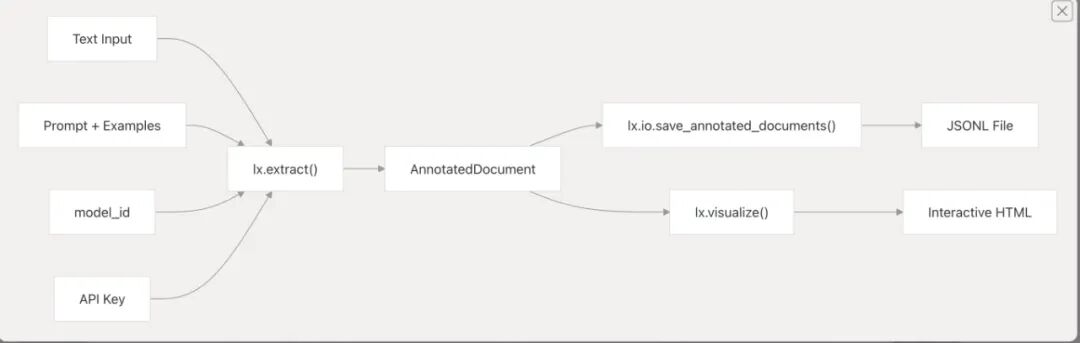
1、定义输入样本;创建提示词(prompt_description)和示例(examples)来指导模型
2、调用 lx.extract() 函数处理输入文本:
内部处理流程如下:
-
• 输入处理:如果 fetch_urls=True且输入是 URL,会自动下载文本 -
• 创建提示模板:使用 PromptTemplateStructured组织提示词和示例 -
• 模型配置:根据参数优先级创建语言模型(优先级: model>config>model_id) -
• 文本处理:通过 Annotator协调文本分块、并行处理和结果解析 -
• 结果对齐:使用 Resolver将提取结果对齐到源文本位置
-
3. 可视化结果
保存结果并生成交互式 HTML 可视化
返回的 AnnotatedDocument 包含:
-
• 原始文本和 document_id -
• Extraction对象列表,每个包含char_interval位置信息 -
• 每个提取的 AlignmentStatus表示匹配质量
注:对于长文档,可以使用 URL 直接处理并启用并行处理和多次提取来提高性能和准确性。系统支持多种模型提供商(Gemini、OpenAI、Ollama 等),通过工厂模式自动选择合适的提供商
调用qwen示例
import langextract as lx
from langextract import factory


from langextract.providers.openai import OpenAILanguageModel

# Text with a medication mention
input_text = "Patient took 400 mg PO Ibuprofen q4h for two days."

# Define extraction prompt
prompt_description = "Extract medication information including medication name, dosage, route, frequency, and duration in the order they appear in the text."

# Define example data with entities in order of appearance
examples = [
    lx.data.ExampleData(
        text="Patient was given 250 mg IV Cefazolin TID for one week.",
        extractions=[
            lx.data.Extraction(extraction_class="dosage", extraction_text="250 mg"),
            lx.data.Extraction(extraction_class="route", extraction_text="IV"),
            lx.data.Extraction(extraction_class="medication", extraction_text="Cefazolin"),
            lx.data.Extraction(extraction_class="frequency", extraction_text="TID"),  # TID = three times a day
            lx.data.Extraction(extraction_class="duration", extraction_text="for one week")
        ]
    )
]

result = lx.extract(
    text_or_documents=input_text,
    prompt_description=prompt_description,
    examples=examples,
    fence_output=True,
    use_schema_constraints=False,
    model = OpenAILanguageModel(
        model_id='qwen-plus',
        base_url='',
        api_key='',
        provider_kwargs={
            'connect_timeout': 60,  # 允许 60 秒完成 SSL 握手
            'timeout': 120          # 保持 120 秒的整体请求超时
        }
    )
)

# Display entities with positions
print(f"Input: {input_text}n")
print("Extracted entities:")
for entity in result.extractions:
    position_info = ""
    if entity.char_interval:
        start, end = entity.char_interval.start_pos, entity.char_interval.end_pos
        position_info = f" (pos: {start}-{end})"
    print(f"• {entity.extraction_class.capitalize()}: {entity.extraction_text}{position_info}")

# Save and visualize the results
lx.io.save_annotated_documents([result], output_name="medical_ner_extraction.jsonl", output_dir=".")

# Generate the interactive visualization
html_content = lx.visualize("medical_ner_extraction.jsonl")
with open("medical_ner_visualization.html", "w") as f:
    if hasattr(html_content, 'data'):
        f.write(html_content.data)  # For Jupyter/Colab
    else:
        f.write(html_content)

print("Interactive visualization saved to medical_ner_visualization.html")
这段代码的核心目标是:使用 langextract 库对接大语言模型(Qwen),从医疗文本中自动提取结构化的药物信息(剂量、途径、名称等),并通过打印、文件保存、HTML 可视化等方式展示结果。适用于医疗文本分析、药物信息抽取等场景。
界面如下:
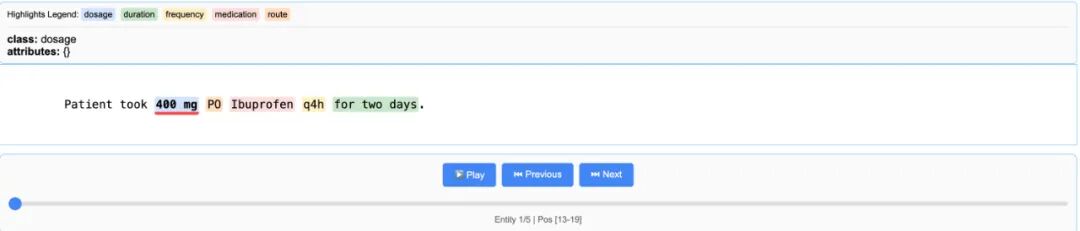
其实一开始是会出现乱码:在生成的html增加utf-8。
<!DOCTYPE html>
<html>
<head>
    <meta charset="UTF-8">
    <title>医疗实体提取可视化</title>
    <style>
        <!-- 原有CSS样式保持不变 -->
    </style>
</head>
<body>
    <!-- 原有HTML内容保持不变 -->
    <div class="lx-animated-wrapper lx-gif-optimized">
        <!-- ... 原有内容 ... -->
    </div>

    <script>
        <!-- 原有JavaScript代码保持不变 -->
    </script>
</body>
</html>
此外,我还发现了这个文档是不支持中文的!!!
增加中文分词
进入tokenizer分词部分:
# ✅ Updated to support Chinese characters (CJK Unified Ideographs, Extension A, Compatibility Ideographs)
#    and other Unicode languages

_LETTERS_PATTERN = (
    r"[A-Za-zu4e00-u9fffu3400-u4dbfuf900-ufaff]+"
)
"""匹配中文、英文的连续字母(包含CJK基本区、扩展A区、兼容区)"""

_DIGITS_PATTERN = (
    r"[0-9uff10-uff19]+"
)
"""匹配阿拉伯数字与全角数字"""

_SYMBOLS_PATTERN = (
    r"[^A-Za-z0-9u4e00-u9fffu3400-u4dbfuf900-ufaffs]+"
)
"""匹配除中文、英文、数字和空格外的符号(含全角符号)"""

_END_OF_SENTENCE_PATTERN = re.compile(r"[.?!。?!]$")
"""匹配句末符号(含中英文标点)"""

_SLASH_ABBREV_PATTERN = (
    r"[A-Za-z0-9u4e00-u9fffu3400-u4dbfuf900-ufaff]+"
    r"(?:/[A-Za-z0-9u4e00-u9fffu3400-u4dbfuf900-ufaff]+)+"
)
"""匹配类似 '中/英/混合' 这种带斜杠的缩写或组合词"""

_TOKEN_PATTERN = re.compile(
    rf"{_SLASH_ABBREV_PATTERN}|{_LETTERS_PATTERN}|{_DIGITS_PATTERN}|{_SYMBOLS_PATTERN}"
)
"""通用token匹配模式:支持中文、英文、数字、符号"""

_WORD_PATTERN = re.compile(
    rf"(?:{_LETTERS_PATTERN}|{_DIGITS_PATTERN})Z"
)
"""匹配完整词语(字母或数字结尾)"""
修改如上内容就可以支持中文啦。
pdf支持
LangExtract目前仅支持处理原始文本字符串。在实际工作流程中,源文件通常是PDF、DOCX或PPTX格式。用户目前必须:
手动将文件转换为文本(丢失布局和出处)。
将纯文本输入到LangExtract中。
手动将提取内容映射回原始文档以进行验证。
单步流程将使LangExtract的采用变得更为简便。
建议的解决方案
将Docling库作为可选前端集成:
Docling可以将多种文档格式转换为统一的DoclingDocument。
它保留了来源(页面、边界框、阅读顺序)。
将提取的文本块按照今天的方式输入到LangExtract中。
通过起源元数据将提取的结果映射回原始文档。
集成将是可选的(pip install langextract[docling]),因此核心包保持无依赖性。
概念验证:这个还只是验证, 没有加入代码中。
import langextract as lx
import textwrap
from pdf_extract import extract_with_file_support

# 1. Define the prompt and extraction rules
prompt = textwrap.dedent("""
    Extract characters, emotions, and relationships in order of appearance.
    Use exact text for extractions. Do not paraphrase or overlap entities.
    Provide meaningful attributes for each entity to add context.""")

# 2. Provide a high-quality example to guide the model
examples = [
    lx.data.ExampleData(
        text="ROMEO. But soft! What light through yonder window breaks? It is the east, and Juliet is the sun.",
        extractions=[
            lx.data.Extraction(
                extraction_class="character",
                extraction_text="ROMEO",
                attributes={"emotional_state": "wonder"}
            ),
            lx.data.Extraction(
                extraction_class="emotion",
                extraction_text="But soft!",
                attributes={"feeling": "gentle awe"}
            ),
            lx.data.Extraction(
                extraction_class="relationship",
                extraction_text="Juliet is the sun",
                attributes={"type": "metaphor"}
            ),
        ]
    )
]

source = "<sample pdf file>.pdf"
result = extract_with_file_support(
    source=source,
    prompt_description=prompt,
    examples=examples,
    model_id="gemini-2.5-flash",
)

# result.extractions[0].extraction_text
# result.extractions[0].provenance
总结:
现在的langextract感觉就是集成了各种大模型。封装好了输入输出。现在其实也不支持pdf。
|
|
|
|
|
| PDF /复杂文档支持 |
|
|
|
| 中文 / 多语言支持 |
|
|
|
| 应用范围 / 任务领域适应性 |
|
|
|
| 准确度 / 稳定性 /一致性 |
|
|
|
| 工程 /扩展性 /集成性 |
|
|
|
| 成本 /效率 |
|
|
|
| 可解释 / 可追踪性 |
|
|
|
除了标记出处(功能也很鸡肋),感觉得不到太大的优势。
