


> “
> 一图胜前言,大家养虾摸鱼的时候可以用到~
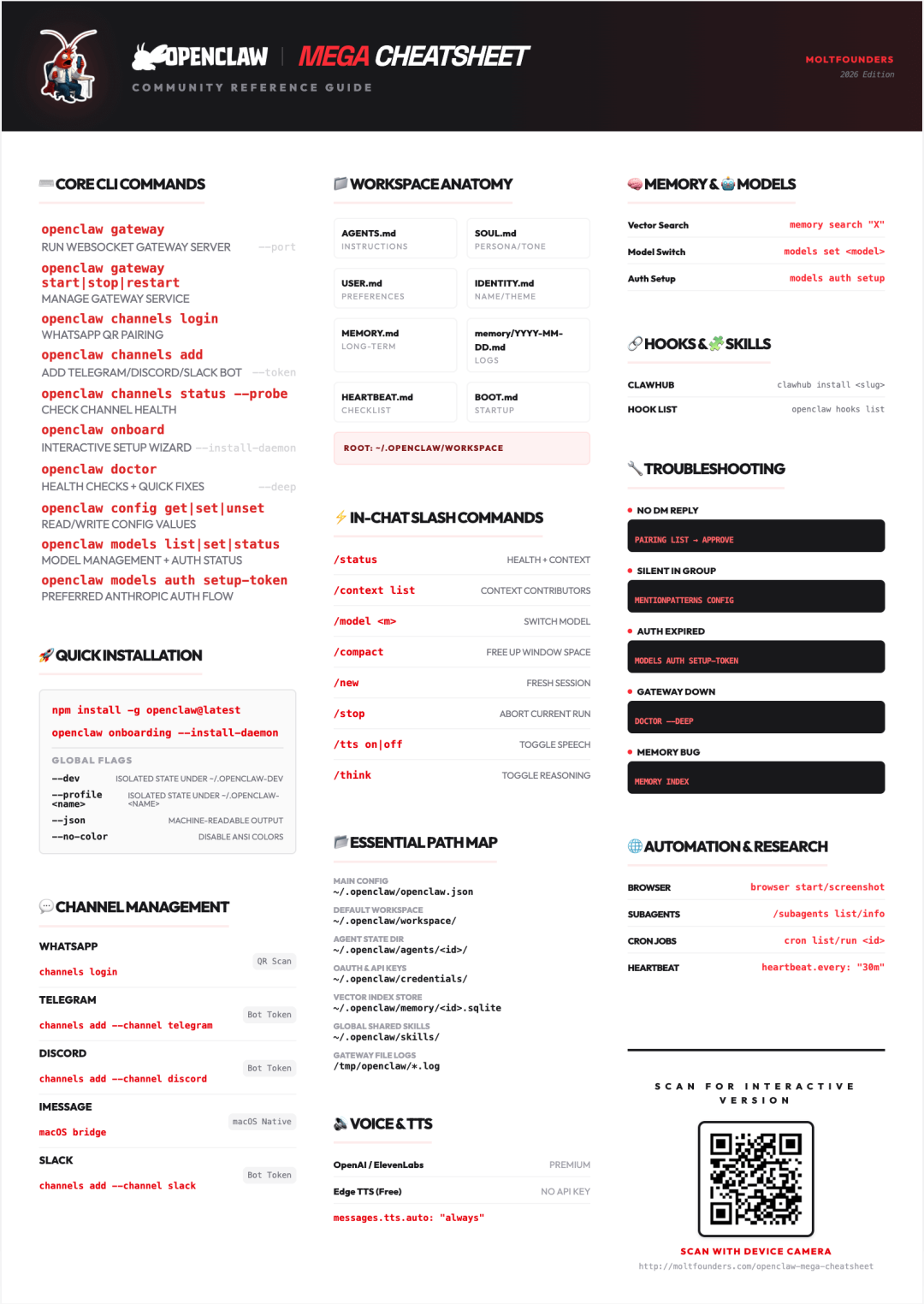
## OpenClaw Mega Cheatsheet 命令速查表
## ⌨️ 核心CLI命令 (Core CLI Commands)
| 命令 | 说明 | 参数选项 |
| — | — | — |
| `openclaw gateway` | 运行WebSocket Gateway服务器 | `–port`,`–bind`,`–token` |
| `openclaw gateway start|stop|restart` | 管理Gateway服务 (launchd/systemd) | – |
| `openclaw channels login` | WhatsApp QR配对 (Web流程) | – |
| `openclaw channels add` | 添加Telegram/Discord/Slack机器人 | `–token` |
| `openclaw channels status –probe` | 检查频道健康状态和连接性 | – |
| `openclaw onboard` | 交互式设置向导 | `–install-daemon` |
| `openclaw doctor` | 健康检查 + 快速修复 | `–deep`,`–yes` |
| `openclaw config get|set|unset` | 读取/写入配置值 (JSON5或原始) | – |
| `openclaw models list|set|status` | 模型管理 + 认证状态 | – |
| `openclaw models auth setup-token` | Anthropic首选认证流程 | – |
| `openclaw models fallbacks add|remove` | 配置模型故障转移链 | – |
| `openclaw memory status|index|search` | 对MEMORY.md + 日志进行向量搜索 | – |
| `openclaw Agents list|add|delete` | 多代理工作区管理 | – |
| `openclaw logs –follow` | 通过RPC追踪Gateway日志文件 | – |
| `openclaw status –all –deep` | 完整诊断 (可粘贴) | `–usage` |
| `openclaw sessions –json` | 列出存储的会话记录 | – |
| `openclaw security audit` | 审计配置的安全风险 | `–fix` |
| `openclaw browser start|tabs|screenshot` | 无头浏览器自动化 | – |
| `openclaw cron list|add|run` | 定时任务管理 | – |
| `openclaw pairing list|approve` | 批准DM配对请求 | – |
| `openclaw reset –scope` | 重置 config/creds/sessions/full | – |
* * *
## 🚩 全局标志 (Global Flags)
| 标志 | 说明 |
| — | — |
| `–dev` | 在 ~/.openclaw-dev 下隔离状态,切换端口 |
| `–profile
| `–no-color` | 禁用ANSI颜色 (遵循 NO_COLOR=1) |
| `–update` | `openclaw update`的简写 (仅源码安装) |
| `-V`,`–version`,`-v` | 打印版本并退出 |
* * *
## 🛠️ 高级命令 (Power Commands)
| 命令 | 说明 |
| — | — |
| `openclaw plugins list|enable|disable` | 管理插件生命周期 |
| `openclaw approvals get|set|allowlist` | 执行审批策略 + 白名单 |
| `openclaw sandbox list|recreate|explain` | 检查/重建沙箱容器 |
| `openclaw system event –text “X”` | 立即/心跳时排队系统事件 |
| `openclaw system heartbeat enable|disable|last` | 控制心跳运行 |
| `openclaw update status|wizard` | 管理发布渠道更新 |
| `openclaw nodes list|pending|approve` | 批准/管理远程节点 |
| `openclaw devices list|approve|rotate|revoke` | 设备令牌生命周期 |
| `openclaw directory peers|groups list` | 发送消息前解析ID |
| `openclaw health –json –verbose` | 直接gateway健康探测 |
| `openclaw dashboard` | 使用当前令牌打开控制UI |
| `openclaw tui –url –token` | 远程安全的终端UI |
* * *
## ⚠️ 命令注意事项 (Command Gotchas)
| 命令 | 注意事项 |
| — | — |
| `models status –probe` | 实时探测会消耗tokens,可能达到提供商限制 |
| `channels status –probe` | 使用`status –deep`进行完整的gateway级诊断 |
| `security audit –fix` | 将安全更改应用到配置/权限 |
| `–update` | 简写行为针对源码安装 |
* * *
## 💬 频道设置 (Channel Setup)
| 平台 | 方式 | 命令 |
| — | — | — |
| 📱 WhatsApp | QR扫描 | `openclaw channels login` |
| ✈️ Telegram | Bot Token | `channels add –channel telegram –token $TOKEN` |
| 🎮 Discord | Bot Token | `channels add –channel discord –token $TOKEN` |
| 💬 iMessage | macOS原生 | macOS bridge |
| 🏢 Slack | Bot Token | `channels add –channel slack` |
| 💬 Google Chat | 服务账户 | `channels add –channel googlechat` |
| 🔒 Signal | 关联设备 | `channels add –channel signal` |
| 📎 MS Teams | Bot注册 | `channels add –channel msteams` |
**快速诊断:**
* 状态:`openclaw channels status –probe`
* 日志:`openclaw channels logs –channel [id]`
* * *
## 📁 工作区文件 (Workspace Files)
| 文件 | 说明 |
| — | — |
| 🤖`AGENTS.md` | 代理的操作指令 |
| ✨`SOUL.md` | 人设、语气、边界 |
| 👤`USER.md` | 用户信息和偏好 |
| 🆔`IDENTITY.md` | 代理名称、表情符号、主题 |
| 🧠`MEMORY.md` | 精选长期记忆 (仅DM) |
| 📅`memory/YYYY-MM-DD.md` | 每日追加日志 |
| 🔧`TOOLS.md` | 本地工具说明 |
| 💓`HEARTBEAT.md` | 心跳检查清单 |
| 🚀`BOOT.md` | 启动检查清单 |
**根目录:**`~/.openclaw/workspace`
* * *
## 🧠 记忆系统 (Memory System)
| 功能 | 说明 |
| — | — |
| **每日日志** | `memory/YYYY-MM-DD.md`- 仅追加,会话开始时读取今天+昨天的日志 |
| **长期记忆** | `MEMORY.md`- 精选事实,仅在主DM会话中加载 |
| **向量搜索** | `memory_search`工具 – 对记忆块进行语义搜索 (~400 tokens) |
| **提供商** | `memorySearch.provider`- 自动选择: local GGUF → OpenAI → Gemini → Voyage |
| **QMD后端** | `memory.backend = “qmd”`- BM25 + 向量 + 重排序 (实验性) |
| **混合搜索** | 0.7/0.3 默认权重 – 向量相似度 + BM25关键词相关性 |
**命令:**
* `openclaw memory index –all`
* `openclaw memory search “X”`
* * *
## 🤖 模型与认证 (Models & Auth)
| 命令 | 说明 |
| — | — |
| `openclaw models list –all` | 查看所有可用模型 |
| `openclaw models set
| `openclaw models set-image
| `openclaw models fallbacks add
| `openclaw models auth setup-token` | Anthropic首选认证 (setup-token) |
| `openclaw models auth add –provider
` | 添加提供商API密钥 |
| `openclaw models status –probe` | 实时探测已配置的认证配置 |
| `openclaw models aliases add
### 故障转移与冷却时间
| 时间 | 说明 |
| — | — |
| 1 min | 短期冷却 |
| 5 min | 中期冷却 |
| 1 hour | 长期冷却 |
* * *
## 🔐 会话配置 (Sessions)
| 配置项 | 说明 |
| — | — |
| `session.dmScope` | main (默认) | per-peer | per-channel-peer | per-account-channel-peer |
| `session.reset.mode` | daily (默认, 凌晨4点本地时间) | idle |
| `session.reset.idleMinutes` | 滑动空闲窗口 (先到先得) |
| `session.resetByType` | 覆盖 dm, group, thread 会话策略 |
| `session.resetByChannel` | 每频道覆盖 (优先级更高) |
| `session.identityLinks` | 映射 provider:id → 跨频道规范身份 |
| `session.sendPolicy` | 阻止特定会话类型的消息传递 |
| `session.store` | `~/.openclaw/agents/{agentId}/sessions/sessions.json` |
> “
> ⚠️**安全提示:**多用户收件箱请使用`per-channel-peer`防止上下文泄露
* * *
## ⚡ 斜杠命令 (Slash Commands)
| 命令 | 说明 |
| — | — |
| `/status` | 会话健康 + 上下文使用 + WhatsApp凭证 |
| `/context list` | 查看上下文窗口内容 (最大贡献者) |
| `/context detail` | 完整系统提示 + 注入的工作区文件 |
| `/model
| `/compact [instructions]` | 总结旧上下文,释放窗口空间 |
| `/new [model]` | 开始新会话 (可选: 设置模型) |
| `/reset` | `/new`的别名 |
| `/stop` | 中止当前运行 + 清除排队的后续操作 |
| `/send on|off|inherit` | 覆盖此会话的消息传递 |
| `/tts on|off` | 切换文字转语音 |
| `/think`或`/verbose` | 切换推理/详细模式 |
| `/config` | 持久化配置更改 |
| `/debug` | 仅运行时配置覆盖 (需要 commands.debug: true) |
* * *
## 🔊 文字转语音 (Text-to-Speech)
| 提供商 | 特点 |
| — | — |
| ElevenLabs | 高级 – 超逼真,延迟较高 |
| OpenAI | 标准 – 快速,高质量语音 |
| Edge TTS | 免费 – 无需API密钥,多语言支持 |
**启用自动TTS:**
`messages.tts.auto: “always”`
* * *
## 📊 日志与诊断 (Logging & Diagnostics)
| 命令 | 说明 |
| — | — |
| `openclaw logs –follow` | 追踪Gateway日志文件 (TTY中彩色) |
| `openclaw logs –json` | 行分隔JSON (每行一个事件) |
| `openclaw logs –limit 200` | 限制日志行数 |
| `openclaw channels logs –channel whatsapp` | 频道特定日志 |
**OTel导出配置:**
`”diagnostics”: { “otel”: { “enabled”: true }}`
* * *
## 🌐 浏览器与定时任务 (Browser & Cron)
### 浏览器操作
| 命令 | 说明 |
| — | — |
| `openclaw browser start|stop` | 启动/停止无头实例 |
| `openclaw browser tabs` | 列出所有打开的页面 |
| `openclaw browser open
| `openclaw browser screenshot` | 捕获当前视图 |
| `openclaw browser navigate
| `openclaw browser click|type|press` | DOM交互 |
| `openclaw browser evaluate
| `openclaw browser pdf` | 将页面导出为PDF |
### 定时任务
| 命令 | 说明 |
| — | — |
| `openclaw cron list` | 列出定时任务 |
| `openclaw cron add` | 创建新的定时任务 |
| `openclaw cron edit
| `openclaw cron enable|disable
| `openclaw cron run
| `openclaw cron runs` | 查看运行历史 |
* * *
## 🔗 钩子与自动化 (Hooks & Automation)
### 内置钩子
| 钩子 | 事件类型 | 说明 |
| — | — | — |
| 💾`session-memory` | command:new | 在/new时保存会话上下文到记忆 |
| 📝`command-logger` | command | 将所有命令记录到审计文件 |
| 🚀`boot-md` | gateway:startup | Gateway启动时运行BOOT.md |
| 😈`soul-evil` | agent:bootstrap | 在清除窗口期间交换SOUL.md |
### 钩子命令
| 命令 | 说明 |
| — | — |
| `openclaw hooks list` | 列出所有发现的钩子 |
| `openclaw hooks enable
| `openclaw hooks disable
| `openclaw hooks info
| `openclaw hooks check` | 检查资格 |
### 事件类型
| 事件 | 触发时机 |
| — | — |
| `command:new` | 发出 /new 时 |
| `command:reset` | 发出 /reset 时 |
| `command:stop` | 发出 /stop 时 |
| `gateway:startup` | 频道启动后 |
| `agent:bootstrap` | 注入工作区文件前 |
* * *
## 🧩 技能系统 (Skills System)
### 技能优先级
| 优先级 | 路径 | 说明 |
| — | — | — |
| 1 | `
| 2 | `~/.openclaw/skills/` | 托管/本地,跨工作区共享 |
| 3 | Bundled skills | OpenClaw内置 (最低) |
### ClawHub注册表
| 命令 | 说明 |
| — | — |
| `clawhub install
| `clawhub update –all` | 更新所有已安装技能 |
| `clawhub sync –all` | 扫描并发布更新 |
### SKILL.md格式
`—name: my-skilldescription: “What this skill does”metadata: openclaw: requires: {…}—`
* * *
## 👥 多代理路由 (Multi-Agent Routing)
| 特性 | 说明 |
| — | — |
| **隔离工作区** | 每个代理有自己的 AGENTS.md, SOUL.md, USER.md |
| **每代理认证** | 每个agentDir独立的认证配置 |
| **会话存储** | 聊天记录在`~/.openclaw/agents/
| **绑定** | 按频道、accountId、peer路由消息 |
### 路由优先级
| 优先级 | 级别 | 说明 |
| — | — | — |
| 1 | peer (精确 DM/group id) | 最高优先级 |
| 2 | guildId (Discord) | 频道级路由 |
| 3 | teamId (Slack) | 团队级路由 |
| 4 | accountId | 账户级路由 |
| 5 | channel | 频道范围回退 |
| 6 | default agent | 最终回退 |
**命令:**
* `openclaw agents add
* `openclaw agents list –bindings`
* * *
## 💓 心跳系统 (Heartbeat System)
| 配置 | 说明 |
| — | — |
| `heartbeat.every` | 间隔 (默认: 30m, Anthropic OAuth为1h) |
| `heartbeat.target` | last | none |
| `heartbeat.to` | 可选收件人覆盖 |
| `heartbeat.model` | 心跳运行的模型覆盖 |
| `heartbeat.prompt` | 自定义提示正文 |
| `heartbeat.activeHours` | 限制到时间窗口 (start/end/timezone) |
> “
> 📋**契约:**如果没有需要关注的事项,回复`HEARTBEAT_OK`。代理会删除仅包含OK的回复。
### HEARTBEAT.md示例
`# Heartbeat checklist- Quick scan: anything urgent?- Daytime: lightweight check-in- Blocked? Note what’s missing`
* * *
## 🔐 沙箱配置 (Sandboxing)
### sandbox.mode
| 模式 | 说明 |
| — | — |
| `”off”` | 无沙箱,工具在主机上运行 |
| `”non-main”` | 仅沙箱非主会话 (默认) |
| `”all”` | 每个会话都在沙箱中运行 |
### sandbox.scope
| 范围 | 说明 |
| — | — |
| `”session”` | 每会话一个容器 (默认) |
| `”agent”` | 每代理一个容器 |
| `”shared”` | 所有沙箱会话共享一个容器 |
### workspaceAccess
| 访问级别 | 说明 |
| — | — |
| `”none”` | 工具仅看到沙箱工作区 (默认) |
| `”ro”` | 在 /agent 只读挂载 |
| `”rw”` | 在 /workspace 读写挂载 |
**设置镜像:**`scripts/sandbox-setup.sh`
**默认镜像:**`openclaw-sandbox:bookworm-slim`
* * *
## 🎯 子代理 (Sub-Agents)
| 特性 | 说明 |
| — | — |
| **并行工作** | 运行研究/长时间任务而不阻塞 |
| **会话隔离** | 独立会话密钥 + 可选沙箱 |
| **自动公告** | 结果发布到请求者的聊天频道 |
| **自动归档** | 会话在60分钟后归档 (可配置) |
### 子代理命令
| 命令 | 说明 |
| — | — |
| `/subagents list` | 列出活跃的子代理 |
| `/subagents stop
| `/subagents log
| `/subagents info
| `/subagents send
### sessions_spawn工具
`{ “task”: “…”, “label”: “…”, “model”: “…”, “thinking”: “…”, “runTimeoutSeconds”: “…”, “cleanup”: “…”}`
**返回:**`{ status, runId, childSessionKey }`
* * *
## 🔧 故障排除 (Troubleshooting)
| 问题 | 解决方案 |
| — | — |
| 无DM回复 | `openclaw pairing list`→ 批准待处理请求 |
| 群组中静默 | 检查 mentionPatterns 配置 (代理需要 @提及) |
| 认证过期 | `openclaw models auth setup-token –provider anthropic` |
| Gateway宕机 | `openclaw doctor –deep`(扫描额外安装) |
| 记忆未索引 | `openclaw memory index`(重新索引记忆文件) |
| 上下文已满 | `/compact`或`/new`(开始新会话) |
| 频道断开 | `openclaw channels status –probe` |
| 会话问题 | `openclaw reset –scope sessions` |
| **通用修复命令** | `openclaw doctor –deep –yes`健康检查 + 快速修复 + 系统服务扫描 |
* * *
## 📂 关键路径 (Key Paths)
| 路径 | 说明 |
| — | — |
| `~/.openclaw/openclaw.json` | 主配置文件 |
| `~/.openclaw/workspace/` | 默认代理工作区 |
| `~/.openclaw/agents/
| `~/.openclaw/agents/
| `~/.openclaw/credentials/` | OAuth/API密钥 |
| `~/.openclaw/memory/
| `/tmp/openclaw/openclaw-YYYY-MM-DD.log` | Gateway日志文件 |
> “
> 💡**提示:**使用`–dev`或`–profile
* * *
## 🚀 快速开始 (Quick Start)
### 全局安装
`npm install -g openclaw@latest`
### 引导设置
`# 1. 引导设置openclaw onboard –install-daemon# 2. 频道链接openclaw channels login# 3. 启动Gatewayopenclaw gateway –port 18789`
### Onboard标志
| 标志 | 说明 |
| — | — |
| `–mode local` | 本地gateway模式 |
| `–mode remote` | 连接到远程gateway |
| `–flow quickstart` | 最小化设置 |
| `–skip-channels` | 跳过频道设置 |
